





No products in the cart.
- August 16, 2025
- 736
- Business Directory
In short
- QR codes connect your counter, packaging and print material to payments, reviews, orders and your listing.
- The most useful for Indian small businesses: UPI payment, Google review, WhatsApp, menu and listing QR codes.
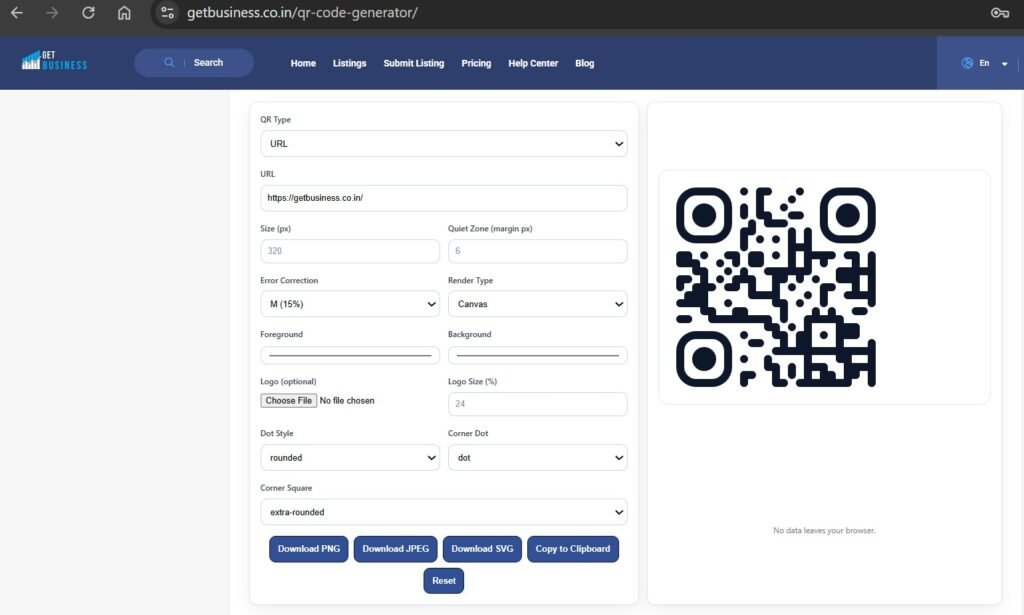
- Make static codes free with our QR code generator — no sign-up, no watermark, no expiry.
- Always test before printing, and add UTM tags to links you want to track.
In this article
QR codes are everywhere in India, mainly because of UPI — almost every customer already knows how to scan one. That makes them one of the cheapest ways for a small business to connect a physical moment (a counter, a table, a product box, a visiting card) to something online: a payment, a review, a WhatsApp chat or your business listing.
Why QR codes matter for small business growth
- Customers already scan. UPI has made QR scanning a daily habit across cities, towns and villages.
- No app needed. Any phone camera reads them.
- Cheap to deploy. Print them on stickers, standees, bills, packaging or visiting cards.
- Measurable. Add tracking tags to the link, and you can see how many people used each code.
10 QR code ideas for small businesses
1. Collect UPI payments
The most common use. A UPI QR code at your counter, on invoices and on delivery bills lets customers pay with PhonePe, Google Pay, Paytm, BHIM or any UPI app. Use your business UPI ID so payments are easy to reconcile, and place the code at eye level.
2. Get more Google reviews
Reviews drive local rankings and trust. Put a Google Review QR code on your counter, table tents or bill folder with a line like "Happy with us? Tap to review." Ask at the right moment — just after a good experience. More on this in social proof for business listings.
3. Share your business listing
A QR code linking to your GetBusiness listing gives customers your address, phone, hours, photos and reviews in one tap. Add it to flyers, banners and visiting cards so people can save your details.
4. Take orders on WhatsApp
A WhatsApp QR code opens a chat with a pre-filled message ("Hi, I'd like to place an order"). Great for bakeries, kirana stores, tiffin services, pharmacies and caterers.
5. Digital menus and catalogues
Restaurants, cafés and cloud kitchens can link to a menu page or PDF that's easy to update when prices change. Retailers and B2B suppliers can link to a product catalogue or price list.
6. Digital visiting cards (vCard)
A vCard QR code on your visiting card or stall standee saves your name, phone, email, website and address straight into the customer's contacts — no typing, no errors.
7. Wi-Fi access for customers
Cafés, salons, clinics, co-working spaces and waiting rooms can show a Wi-Fi QR code so customers connect without asking for the password. Our generator creates the code in your browser, so the password isn't sent to any server.
8. Offers and coupons
Print a QR code on bills or packaging that leads to a repeat-visit coupon, festive offer or loyalty sign-up. Change the offer page without reprinting the code.
9. Product information and videos
Link to setup instructions, warranty registration, care guides or a short how-to video on YouTube. This reduces support calls and returns for electronics, furniture and appliances.
10. Social media follows
An Instagram or YouTube QR code at your counter turns walk-in customers into followers you can reach again. See promoting your business listing on social media.
Where to place QR codes
| Place | Best QR types |
|---|---|
| Billing counter | UPI payment, Google review, listing |
| Tables and waiting areas | Menu, Wi-Fi, review, Instagram |
| Bills and invoices | UPI payment, review, offer |
| Product packaging | Product info, video, WhatsApp, warranty |
| Visiting cards and flyers | vCard, listing, website |
| Shop window and banners | Listing, WhatsApp, offer |
Safety and common concerns
- QR code fraud. Scammers stick fake UPI codes over real ones. Check your counter codes daily, use tamper-proof stickers, and tell customers to confirm your business name in their UPI app before paying.
- Never ask customers to scan to receive money — receiving a UPI payment never requires scanning or entering a PIN.
- Make it scannable: high contrast (dark code on light background), a quiet margin around it and a minimum print size of about 2 cm × 2 cm, larger if scanned from a distance.
- Test before printing on two or three different phones.
- Keep the destination working. A static QR code never expires, but it breaks if the link behind it stops working.
How to track QR code performance
Add UTM tags to the link before making the QR code, for example: https://yoursite.com/menu?utm_source=qr&utm_medium=table&utm_campaign=menu. Your website analytics (Google Analytics or Site Kit) will then show visits from each code. For UPI codes, your payment app's reports show the transactions. For review codes, watch how your review count grows.
How to create a free QR code (step by step)
- Open our free QR code generator.
- Choose a type — GetBusiness Listing, Website, UPI Payment, Google Review, WhatsApp, Wi-Fi, vCard, Menu and more.
- Fill in the details; the preview updates as you type.
- Customise colours, dot style and add your logo.
- Check the built-in scan check says it looks scannable, test with your phone, and download as PNG, JPEG or SVG.
Final thoughts
The best QR codes solve a small problem for the customer: paying faster, ordering easily, saving your number or leaving a review in seconds. Start with one or two — UPI and Google reviews are the easiest wins — and add more as you see what customers use.
Frequently asked questions
Are QR codes free to make?
Yes. Static QR codes from our generator are free, with no sign-up, watermark or expiry date.
Do QR codes expire?
Static QR codes don't expire. They keep working as long as the link or content behind them still works.
Which QR code is most useful for a small business in India?
A UPI payment QR code, followed by a Google review QR code and a WhatsApp order QR code.
How do I stop QR code fraud at my shop?
Check your printed codes regularly for stickers placed over them, use tamper-proof or laminated codes, and ask customers to confirm your business name in their UPI app before paying.
Put your business on GetBusiness — free
Add your address, phone, hours, photos and services once and get found in category and city searches across India. The Starter plan is free; paid plans add more categories, links and badges.
Add Comment
You must be logged in to post a comment.